MCU OTA XMODEM Interaction Guide
Purpose
This document explains how a Wi-Fi module performs OTA firmware upgrades for a third-party MCU.
1. Hardware prerequisites
Module
MCU
2. Software prerequisites
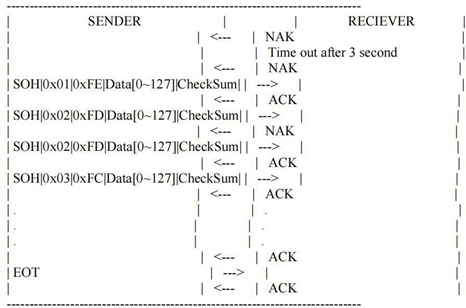
The Wi-Fi module supports OTA upgrades for third-party MCUs. The third-party MCU must support firmware upgrades over the standard XMODEM protocol.
3. Upgrade flow
- The Wi-Fi module transfers third-party MCU firmware over the standard XMODEM protocol. The OTA upgrade is initiated from the App.
- Upload the OTA file to the backend and publish it
- The mobile App discovers new firmware and triggers a device upgrade.
- Preparation before upgrade
| SENDER | RECEIVER | |
|---|---|---|
| ==App upgrade firmware== | ==-------->== | ==Wi-Fi module== |
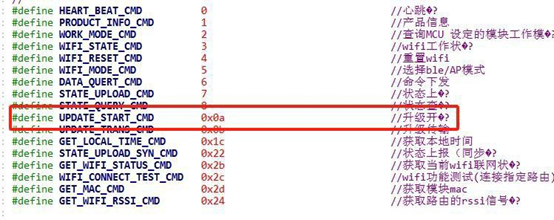
| 0x0A command | ||
| ==Wi-Fi module== | ==-------->== | ==MCU enters OTA mode== |
3.3 Upgrade protocol
The App triggers an OTA upgrade. The module then sends command 0x0A to the MCU. Its payload contains the OTA type and firmware key; see the serial protocol document for details.
The MCU confirms that it is ready to upgrade and replies with 0x43.
After receiving the reply, the Wi-Fi module transfers the firmware packets to the MCU over XMODEM.