

Development Solution Overview
9.1 Front-End Development Solution
9.2 Distributed Configuration Center Solution
1) Why etcd?
etcd is a distributed, reliable key-value store for critical data in distributed systems. It can provide service registration and discovery as well as centralized configuration management. Because it is written in Go, it integrates well with the Ubases IoT backend technology stack.
2) What Is etcd?
etcd is a consistent distributed key-value store. It provides a reliable way to store data across a distributed system or cluster and handles leader election gracefully, even during network partitions or machine failures.
As projects such as CoreOS and Kubernetes gained traction in the open-source community, etcd—used as a highly available, strongly consistent service discovery store—drew increasing attention from developers.
Main characteristics:
- Simple: An HTTP+JSON API that you can use easily with curl.
- Secure: Optional SSL client authentication.
- Fast: Each instance supports about one thousand write operations per second.
- Reliable: Fully distributed using the Raft algorithm.
- Data: Persistent by default—etcd persists data on every update.
3) etcd Use Cases
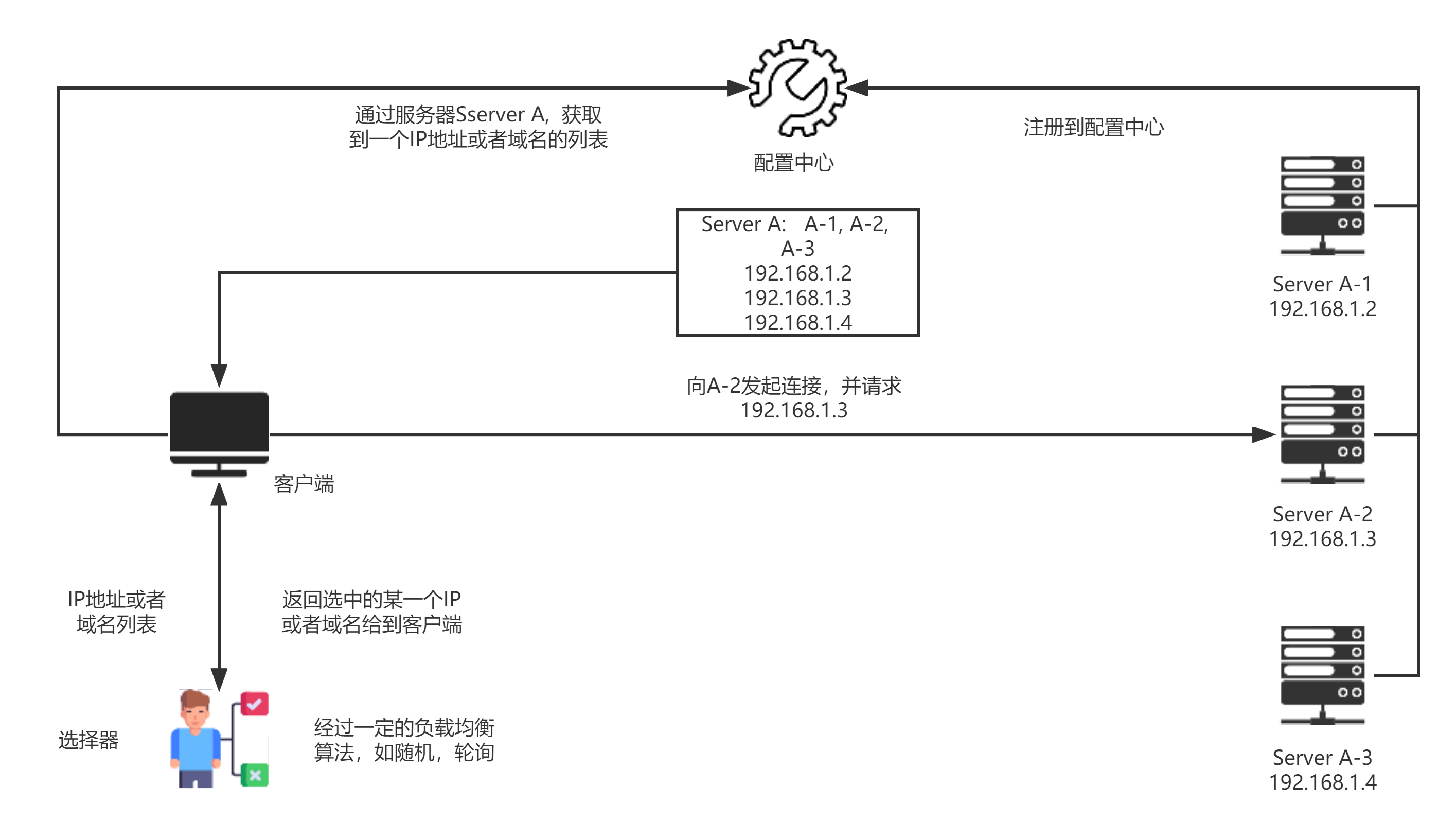
Scenario 1: Service Discovery
Service discovery addresses a common challenge in distributed systems: enabling processes or services in the same cluster to locate one another by name and establish connections. A service first registers its name and IP address or domain name with the etcd configuration center. A client then retrieves the list of addresses mapped to that service name, uses a client-side load-balancing algorithm such as random selection or round robin to select one address, and connects to it.
Scenario 2: Configuration Center
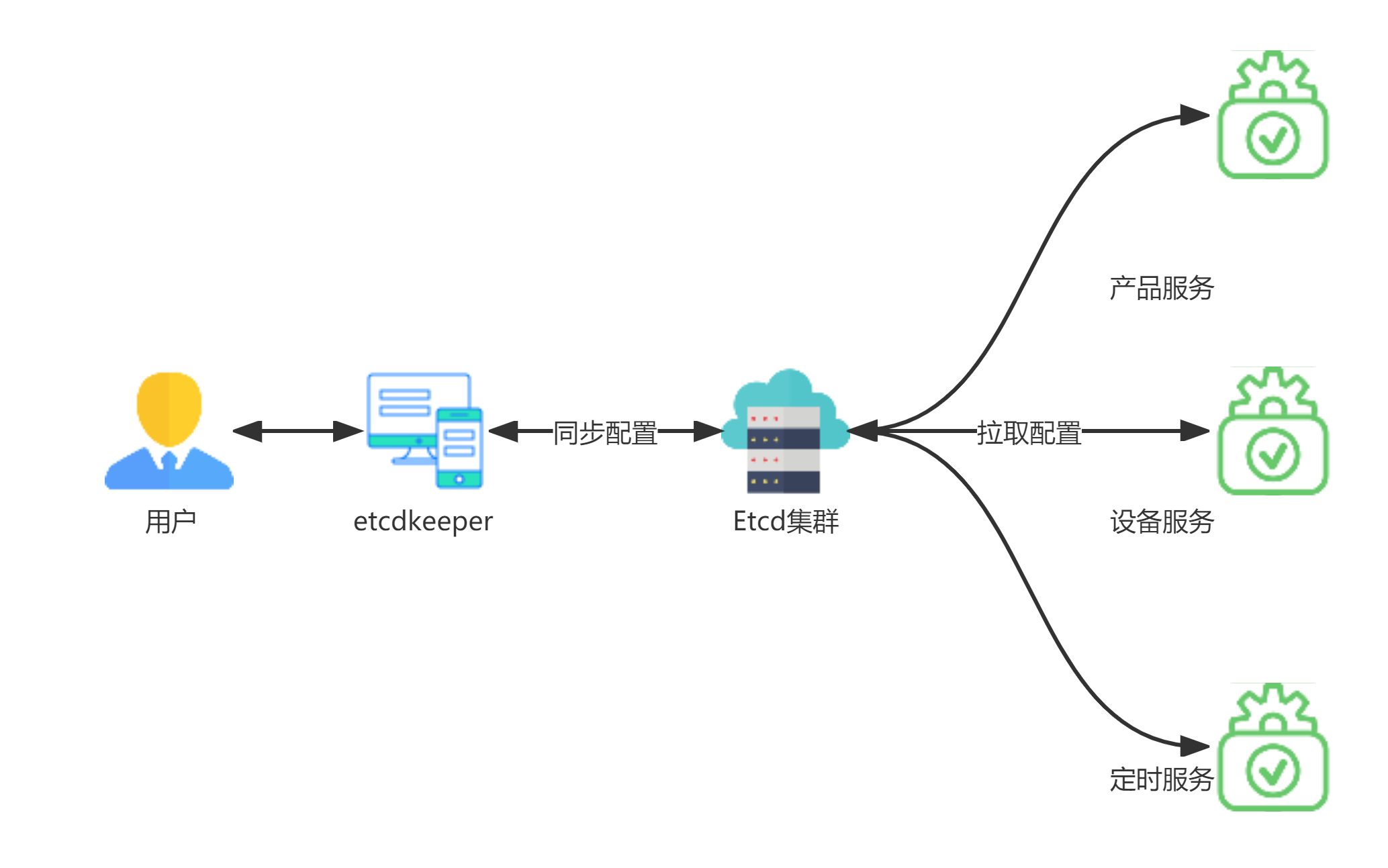
Production applications typically run in clusters. When a configuration changes in etcd, the application cluster can receive the update promptly, allowing a single change to update multiple services and reducing deployment overhead. During deployment, service configuration files are written to the etcd configuration center automatically or manually. These files are divided into shared configuration and service-specific configuration. At startup, each service retrieves and merges both sets before starting. Administrators can update configuration through the etcdkeeper UI, after which etcd pushes the changes to the microservices in real time. Changes to settings such as ports require the services to be restarted in batches, for example with kubectl, so that they retrieve the latest configuration.
4) etcd Configuration Management Flow
Users change etcd cluster configuration files via the etcdkeeper UI. On service startup, related configuration documents are pulled from the etcd cluster for service initialization.
9.3 MCU SDK Development Solution
The MCU SDK is generated automatically from the product functions defined on the Ubases IoT open platform. When a user clicks Download, the platform loads the MCU SDK template, retrieves the product data-point definitions from the database or cache, renders the template, and streams MCU_SDK.zip to the client. The generated SDK includes communication and protocol-parsing frameworks and can be added directly to an existing project to accelerate MCU development.
.png?imageslim)
9.4 Ubases IoT Error Code Solution
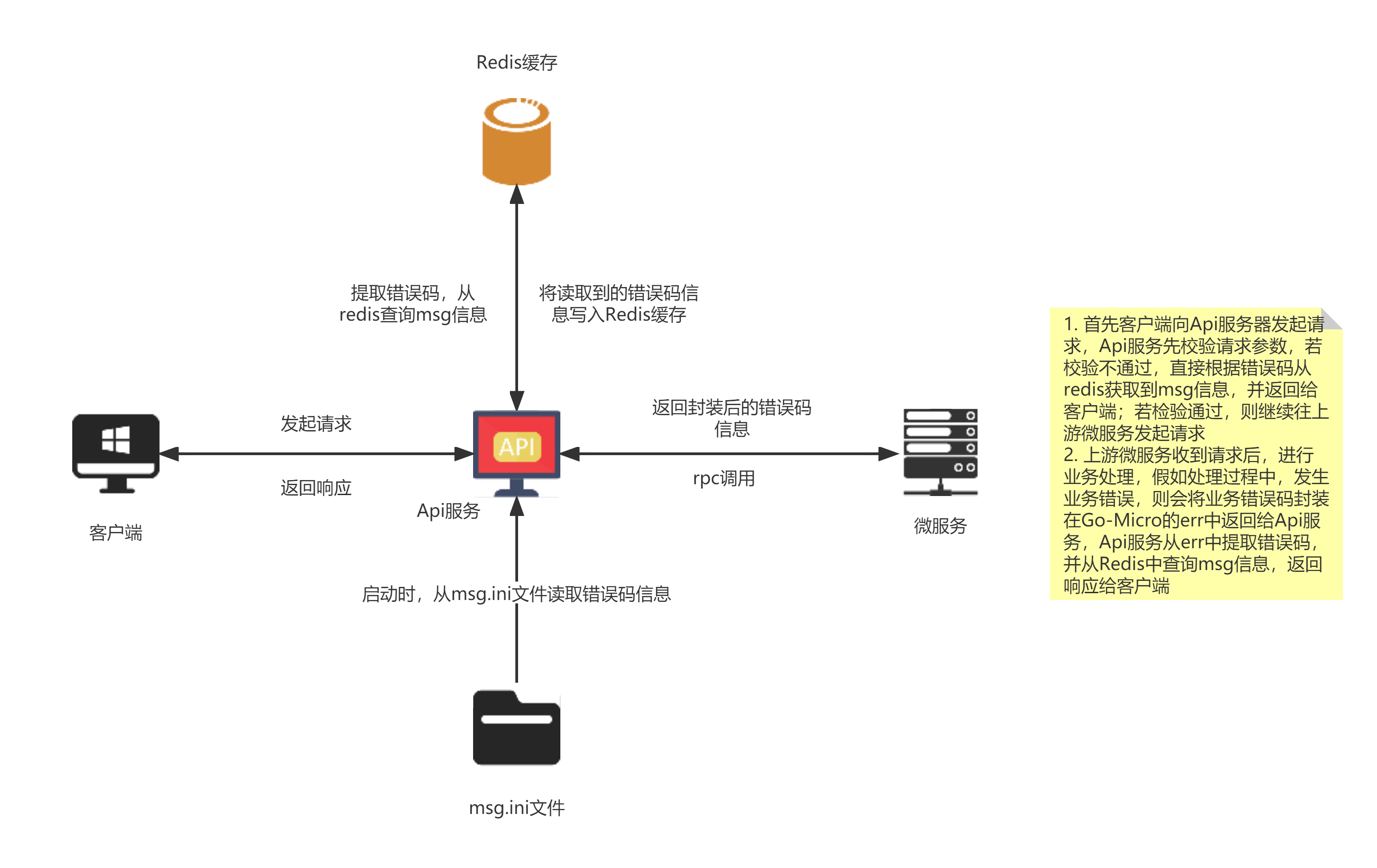
1) Ubases IoT Error Code Handling Flow
2) Error Code Format
Error codes use a unified 6-digit numeric format as follows:
统一格式: A-BB-CCC
A: 表示错误类别,如1代表系统级错误,2代表输入参数错误,3代表业务级错误,4代表内部服务错误
B: 表示微服务项目名称,一般微服务项目数量不会超过99个,已经够用,范围01-99
C: 表示具体错误编号,自增即可,范围001-999
Segment B is allocated by business domain, with reserved ranges for future needs. Service assignments for segment B are as follows:
| Segment B | Corresponding service |
|---|---|
| 01 | iot-user-service |
| 02 | iot-auth-service |
| 03 | iot-mqtt-service |
| 04 | iot-mqtt-data-service |
| 05 | iot-sys-notifier-service |
| 06-20 | Reserved |
| 21 | iot-cloud-api-service |
| 22 | iot-product-service |
| 23 | iot-device-service |
| 24 | iot-intelligence-service |
| 25 | iot-device-simulator |
| 26 | iot-system-service |
| 27 | iot-open-system-service |
| 28 | iot-basic-service |
| 29 | iot-log-service |
| 30 | iot-statitstics-service |
| 31 | iot-oss-service |
| 32 | iot-language-service |
| 33 | iot-document-service |
| 34-50 | Reserved |
| 51 | iot-app-api-service |
| 52 | iot-app-build-service |
| 53 | iot-app-message-service |
| 54 | iot-app-notifier-service |
| 55 | iot-app-oem-service |
| 56 | iot-job-service |
| 57 | iot-device-job-service |
| 58 | iot-ip-service |
| 59 | iot-weather-service |
| 60-99 | Reserved |
3) Error Code Categories
a) System-level errors
For system-level errors, segment A is 1, segment B may be 00, and segment C increments. For example, 100001 means system error. Common system-level error codes (to be supplemented or replaced over time):
| Error code | Error message | Detailed description |
|---|---|---|
| 100001 | system error | System error |
| 100002 | service unavailable | Service unreachable |
| 100003 | remote service error | Remote service error |
| 100004 | rpc error | RPC error |
| 100005 | illegal request | Illegal request |
| 100006 | invalid user | Invalid user |
| 100007 | request body length over limit | Request length exceeds limit |
| 100008 | request api not found | API does not exist |
| 100009 | http method not support | HTTP method not supported |
| 100010 | ip requests over limit | IP request rate exceeds limit |
| 100011 | user requests over limit | User request rate exceeds limit |
| 100012 | api request over limit | API request rate exceeds limit |
b) Input parameter errors
For input parameter errors, segment A is 2, segment B is filled by service category, and segment C by the specific error. For example, 251001 means product key is empty in iot-app-api-service. Input parameter error codes (to be supplemented):
| Error code | Error message | Error description |
|---|---|---|
| 251001 | product key is empty | Product key is empty |
| ... | ... | ... |
c) Business-level errors
For business-level errors, segment A is 3, segment B is filled by service category, and segment C by the specific error. For example, 351001 means phone number is empty in iot-app-api-service. Business-level error codes (to be supplemented):
| Error code | Error message | Error description |
|---|---|---|
| 355001 | flash screen create error | Splash screen create error |
| ... | ... | ... |
d) Internal service errors
For internal service errors, segment A is 4, segment B is filled by service category, and segment C by the specific error. For example, 402001 means auth service unavailable in iot-auth-service. Internal service error codes (to be supplemented):
| Error code | Error message | Error description |
|---|---|---|
| 402001 | auth service unavailable | Auth service unreachable |
| ... | ... | ... |
Note: The input parameter, business-level, and internal service error code tables above are only examples of how to define error codes; they do not imply that error codes must start in this order.