

Deployment Solution
Materials to Prepare Before Deployment
See Materials to Prepare Before Development for required materials.
Standard Deployment Solution
The original reference environment uses CentOS 7.9 on a 4-vCPU, 16-GB RAM, 200-GB cloud server. Because CentOS 7 has reached end of life, production deployments should use a currently supported, compatible Linux distribution agreed with Ubases IoT. On AWS, use the SSH key created with the instance for remote access. When resources permit, separate application, device, database, and backup workloads onto different servers and deploy each third-party component on the appropriate host.
Database server
- [x] ClickHouse
- [x] MySQL
- [x] Redis
Device server
- [x] VerneMQ
Application server:
- [x] Nginx
- [x] Zipkin
- [x] Etcd
- [x] etcdkeeper
- [x] NATS
- [x] Prometheus
- [x] XXL-JOB
Database Initialization
Ubases IoT provides ClickHouse and MySQL initialization scripts. Create the databases first, review the scripts and backup plan, and then have an authorized database administrator run them manually. The scripts contain the initialization data required by the system. 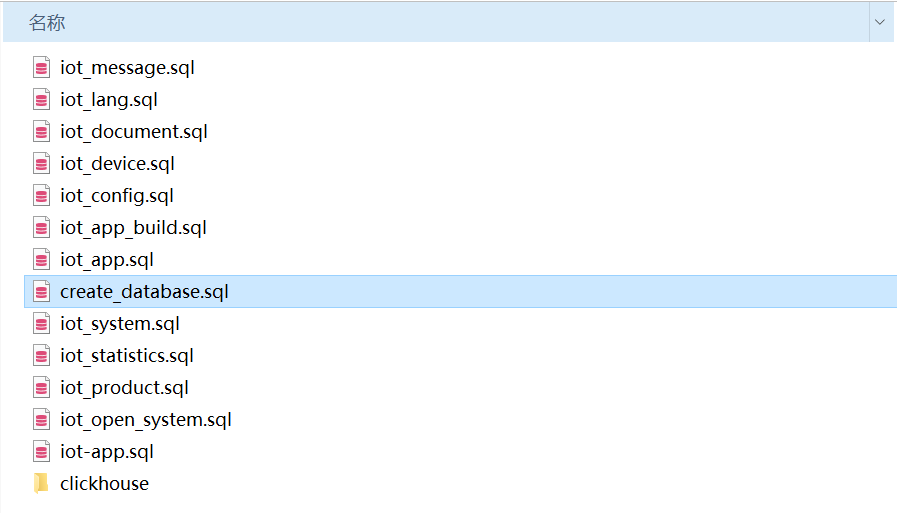
Obtain Code & Binaries
Some open-source code and the private cloud binaries are available through GitHub or the delivery channel specified in your contract. Download the executables to the application server, verify their integrity, update the configuration, and then run them with the startup shell scripts.
Download programs
# Download service programs
git clone https://xxxxx.com/aitihings

# Set permissions
chmod a+x iot-*

ll
-rwxr-xr-x  1 root root   69029888 12月 21 10:39 iot-app-api-service
-rwxr-xr-x  1 root root   55803304 12月 15 10:10 iot-app-message-service
-rwxr-xr-x  1 root root   67381352 12月 20 10:00 iot-app-oem-service
-rwxr-xr-x  1 root root   45102152 12月 15 10:07 iot-auth-service
-rwxr-xr-x  1 root root   53261896 12月 15 09:58 iot-basic-service
-rwxr-xr-x  1 root root   76361728 12月 15 17:35 iot-cloud-api-service
-rwxr-xr-x  1 root root   32043008 12月 15 10:13 iot-device-job-service
-rwxr-xr-x  1 root root   83795000 12月 15 16:16 iot-device-service
-rwxr-xr-x  1 root root   52433256 12月 15 09:58 iot-document-service
-rwxr-xr-x  1 root root   61913352 12月 15 09:57 iot-intelligence-service
-rwxr-xr-x  1 root root   48097032 12月 15 10:06 iot-ip-service
-rwxr-xr-x  1 root root   57441576 12月 15 10:14 iot-job-service
-rwxr-xr-x  1 root root   55310824 12月 15 10:14 iot-language-service
-rwxr-xr-x  1 root root   48706344 12月 15 10:17 iot-log-service
-rwxr-xr-x  1 root root    8544256 12月 15 10:10 iot-mqtt-data-service
-rwxr-xr-x  1 root root   61023464 12月 15 10:09 iot-mqtt-service
-rwxr-xr-x  1 root root   53685256 12月 15 10:18 iot-oauth-service
-rwxr-xr-x  1 root root   58174600 12月 15 10:00 iot-open-system-service
-rwxr-xr-x  1 root root   59979368 12月 15 10:05 iot-oss-service
-rwxr-xr-x  1 root root   63470856 12月 16 13:08 iot-product-service
-rwxr-xr-x  1 root root   64854376 12月 15 10:17 iot-statistics-service
-rwxr-xr-x  1 root root   57182440 12月 15 10:04 iot-sys-notifier-service
-rwxr-xr-x  1 root root   60156968 12月 15 09:56 iot-system-service
-rwxr-xr-x  1 root root   56338280 12月 21 10:39 iot-user-service
-rwxr-xr-x  1 root root   49309736 12月 15 10:03 iot-weather-service
Configuration files
Configuration files use YAML and include settings for the web services, databases, Redis, object storage, NATS, Zipkin, etcd, JWT, MQTT, and other components. The values below are examples only. Replace all sample passwords, signing keys, hostnames, and endpoints before deployment, and store production secrets using an approved secret-management mechanism.
# Web configuration
service:
  httpAddr: 0.0.0.0:31002 # API listen port
  httpqps: 100000  # Supports runtime dynamic adjustment
  IPLimitRequest: 5000 # IP rate limit
  logfile: "./logs/iot-app-api-service.log" # Log file storage; auto-backup after 50M, auto-delete after 7 days
  loglevel: "debug" # Log level

# Database configuration
database:
  database: xxxxxx
  driver: mysql
  connstr: root:123456@tcp(127.0.0.1:3306)/iot_device?charset=utf8mb4&parseTime=True&loc=Local

# Redis configuration
redis:
  Cluster: false
  Addrs: ["127.0.0.1:6379"]
  Username:
  Password: "123456"
  Database: 0
  MinIdleConns: 5
  IdleTimeout: 600
  PoolSize: 50
  MaxConnAge: 3600

# OSS configuration (currently supports qiniu, ali, s3; obtain accessKey from the corresponding platform)
oss:
  useOss: "qiniu"
  qiniu:
    Endpoint: ""
    AccessKeyID: ""
    AccessKeySecret: ""
    BucketName: ""
  ali:
    Endpoint: ""
    AccessKeyID: ""
    AccessKeySecret: ""
    BucketName: ""
  s3:
    Endpoint: ""
    AccessKeyID: ""
    AccessKeySecret: ""
    BucketName: ""
    Region: "cn-north-1"

# Message queue configuration
NATS:
  addrs: ["nats://nat123456@127.0.0.1:4222"]

################### Microservice governance configuration below ####################
zipkin:
  url: http://127.0.0.1:9411/api/v2/spans

etcd:
  address: ["127.0.0.1:2379"]
  username: ""
  password: ""


# JWT key configuration
AppJwt:
  SigningKey: "test.AppJwt"
  AccessTokenTTL: 604800
  RefreshTokenTTL: 608400  # RefreshTokenTTL must be greater than AccessTokenTTL

# MQTT configuration
MQTT:
  addrs: ["tcp://127.0.0.1:1885"]  # For cluster deployment, configure one address
  clientid: "svr_iot-mqtt-service.test"
  user: "testmqttservice"
  password: "23423e88c008b77348de63ee40ed8532"
  offline: false   # Whether to send a will message on disconnect
  CacheControl:
    Register: 600 # Unit: seconds
    Publish: 600 # Unit: seconds
    Subscribe: 600 # Unit: seconds
Run microservices
# Check & run
chmod a+x check.sh
./check.sh

ps -ef |grep iot-
root     11486     1  1 12月16 ?      02:38:24 /opt/bat/iot-device-service
root     11900     1  1 12月16 ?      02:36:24 /opt/bat/iot-product-service
root     20006     1  0 12月15 ?      00:08:33 /opt/bat/iot-system-service
root     20182     1  0 12月15 ?      00:09:10 /opt/bat/iot-intelligence-service
root     20338     1  0 12月15 ?      00:08:06 /opt/bat/iot-document-service
root     20488     1  1 12月15 ?      03:03:44 /opt/bat/iot-basic-service
root     20840     1  0 12月15 ?      00:08:32 /opt/bat/iot-open-system-service
root     21459     1  0 12月15 ?      00:08:47 /opt/bat/iot-weather-service
root     21614     1  6 12月15 ?      11:13:14 /opt/bat/iot-sys-notifier-service
root     21801     1  0 12月15 ?      00:08:24 /opt/bat/iot-oss-service
root     21870     1  0 12月21 ?      00:03:12 /opt/bat/iot-cloud-api-service
root     21980     1  0 12月15 ?      00:08:24 /opt/bat/iot-ip-service
root     22068     1  1 12月21 ?      00:35:44 /opt/bat/iot-app-api-service
root     22142     1  0 12月21 ?      00:01:38 /opt/bat/iot-user-service
root     22171     1  0 12月15 ?      00:08:44 /opt/bat/iot-auth-service
root     22488     1  0 12月15 ?      00:09:13 /opt/bat/iot-mqtt-service
root     22561     1  1 12月15 ?      03:20:01 /opt/bat/iot-mqtt-data-service
root     22760     1  0 12月15 ?      00:09:20 /opt/bat/iot-app-message-service
root     23225     1  0 12月15 ?      00:01:00 /opt/bat/iot-device-job-service
root     23358     1  1 12月15 ?      03:02:22 /opt/bat/iot-job-service
root     23541     1  0 12月15 ?      00:09:09 /opt/bat/iot-language-service
root     23829     1  0 12月15 ?      00:09:42 /opt/bat/iot-statistics-service
root     23995     1  0 12月15 ?      00:09:24 /opt/bat/iot-log-service
root     24156     1  0 12月15 ?      00:10:17 /opt/bat/iot-oauth-service
Deploy Web
Web sites include the Cloud Management Platform and Development Platform. Platform code is open source and can be downloaded from Cloud GitHub and Open GitHub.
# Get code
git clone https://cloud
git clone https://open

# Build Cloud Management Platform
cd cloud
npm run build

# Build Development Platform
cd open
npm run build
Configure the web build output paths in Nginx
Cloud Management Platform
Prepare the Cloud Management Platform domain certificate, set ssl_certificate and ssl_certificate_key, point location / to the web path built above, and proxy location /api to the iot-cloud-api-service service
server {
       listen 2888 ssl;
       server_name  Localhost;
       add_header X-XSS-Protection 1;
       add_header X-Content-Type-Options "nosniff";

       ssl_certificate /opt/xxxxxx/cert/cloud/server.pem;
       ssl_certificate_key /opt/xxxxxx/cert/cloud/server.key;
       ssl_session_cache    shared:SSL:1m;
       ssl_session_timeout  5m;
       ssl_ciphers  HIGH:!aNULL:!MD5;
       ssl_prefer_server_ciphers  on;

       location / {
             root /opt/xxxxxx/open/iot-platform-web;
             # Fix 404
             try_files $uri $uri/ /index.html;
       }
       location /api {
             proxy_set_header Host $host;
             proxy_set_header X-Real-IP $remote_addr;
             proxy_set_header X-Forwarded-For $proxy_add_x_forwarded_for;
             proxy_buffering off;
             rewrite ^/api/(.*)$ /$1 break;
             proxy_pass http://127.0.0.1:31001;
       }
}
Development Platform Access
Prepare the Development Platform domain and certificate. For self-issued certificates, consider acme or certbot. As with the Cloud Management Platform, set ssl_certificate and ssl_certificate_key, point location / to the web path built above, and proxy location /api to the iot-cloud-api-service service
location /: Development Platform web path
location /api: proxy for Development Platform APIs
location /.well-known/apple-app-site-association: third-party login authorization access path
location /mqtt: proxy for MQTT WebSocket service
server {
       listen 2887 ssl;
       server_name  Localhost;
       add_header X-XSS-Protection 1;
       add_header X-Content-Type-Options "nosniff";

       ssl_certificate /opt/xxxxxx/cert/cloud/server.pem;
       ssl_certificate_key /opt/xxxxxx/cert/cloud/server.key;
       ssl_session_cache    shared:SSL:1m;
       ssl_session_timeout  5m;
       ssl_ciphers  HIGH:!aNULL:!MD5;
       ssl_prefer_server_ciphers  on;

       location / {
           root /opt/xxxxxx/cloud/iot-open-web;
           # Fix 404
           try_files $uri $uri/ /index.html;
       }

       location /api {
           proxy_set_header Host $host;
           proxy_set_header X-Real-IP $remote_addr;
           proxy_set_header X-Forwarded-For $proxy_add_x_forwarded_for;
           proxy_buffering off;
           rewrite ^/api/(.*)$ /$1 break;
           proxy_pass http://127.0.0.1:31001;
       }
       location /.well-known/apple-app-site-association {
           proxy_set_header Host $host;
           proxy_set_header X-Real-IP $remote_addr;
           proxy_set_header X-Forwarded-For $proxy_add_x_forwarded_for;
           proxy_buffering off;
           rewrite ^/api/(.*)$ /$1 break;
           proxy_pass http://127.0.0.1:31001/.well-known/apple-app-site-association;
       }
       location /mqtt {
           proxy_pass http://127.0.0.1:8883/mqtt;
           proxy_set_header   Host             $host;
           proxy_set_header   X-Real-IP        $remote_addr;
           proxy_set_header   X-Forwarded-For  $remote_addr;
           proxy_set_header   X-Forwarded-Proto http;
           proxy_http_version 1.1;
           proxy_set_header Upgrade $http_upgrade;
           proxy_set_header Connection "upgrade";
       }
}
Cloud Management Platform: https://{domain}:2888. Sign in with the administrator account issued during deployment and change its initial password immediately.
Development Platform: https://{domain}:2887. Register or provision an account according to the deployment policy.