

Overview
Once the firmware has been flashed, power on the AiPi-PalChatV1 to verify that the Baidu RTC feature is working properly.
Use a Type-C cable to connect the AiPi-PalChatV1 to a power source (a USB port on your computer or a 5V charger).
⚠️ The AiPi-PalChatV1 draws a fairly high operating current. Powering it directly with a Type-C cable is recommended — avoid powering it through a USB-to-serial adapter, as insufficient power may cause it to work abnormally.
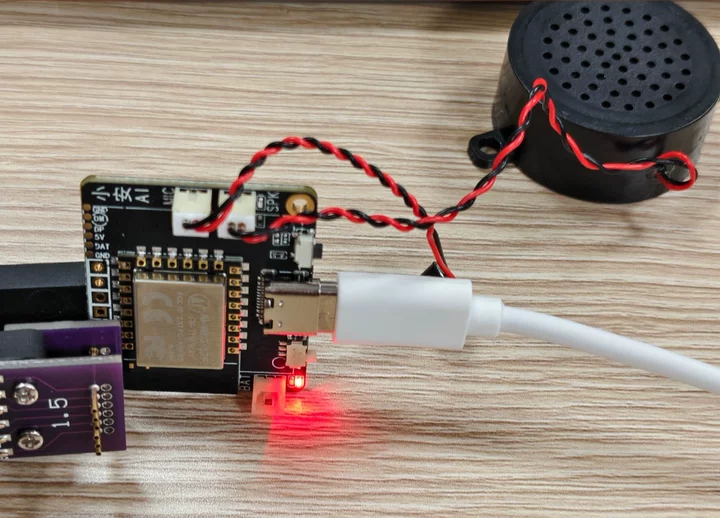
- Say “Xiao An, start network configuration” (你好小安,开始配网) to the board; the board replies “Starting network configuration!”
- Open the WeChat Mini Program “Ai-Thinker IOT” on your phone
- Select “AI Hardware Agent” → tap “Add Device”
- Scan for nearby devices and select your AiPi-PalChatV1
- Enter the WiFi name and password, then tap confirm
- Wait a moment — the board announces “Network connected”, which means network configuration is complete
💡 Once provisioning succeeds, the WiFi details are saved automatically and the board reconnects on the next power-up, so there is no need to repeat it.


Once the network is configured, open a serial terminal and connect it to the board’s serial port, then send the following three commands in order to configure the Baidu RTC parameters. The values you need are described in Getting Connection Info.
💡 Tip: Press Enter after typing each command. The serial port returns the corresponding uppercase confirmation message when the configuration succeeds.
1. Set the application ID:
brtc-appid-set your-app-id
Example: brtc-appid-set appxxxxxxxxx → returns APPID_SET
2. Set the resource ID:
brtc-license-set your-resource-id
Example: brtc-license-set a96cbxxxxxxxxxxx → returns LICENSE_SET
3. Set the Access Key / Secret Key:
brtc-aksk-set your-AccessKey your-SecretKey
⚠️ Note: Separate the Access Key and Secret Key with a space. Neither key contains a space itself.
Example: brtc-aksk-set ALTAxxxxxxxxxxx 42efbexxxxxxxxx → returns AKSK_SET
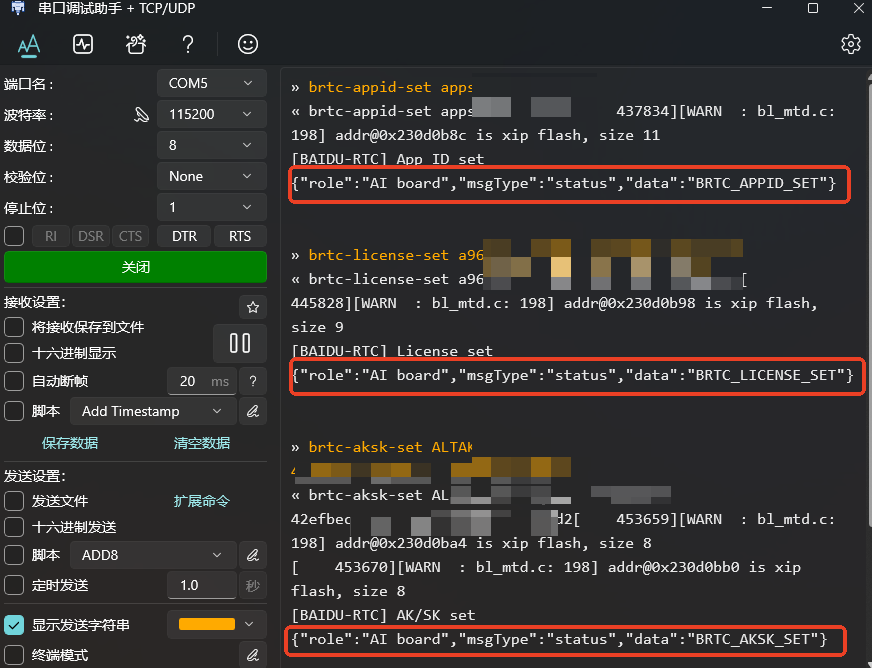
When the configuration is done, power-cycle the board (unplug the Type-C cable and plug it back in) and wait for it to boot and connect to WiFi automatically.
Say “Xiao An” (你好小安) to wake it up, and you can start a voice conversation.
Things you can try:
- Chat: What’s the weather like today, tell me a joke, what’s your name
FAQ
Q: What causes the serial port to return BRTC_CONNECT_FAIL?
A: If the serial port returns the following log, the Baidu RTC configuration is incorrect:
{"role":"AI board","msgType":"status","data":"BRTC_CONNECT_FAIL"}Check that the three parameters configured in step 3 are correct:
- Application ID: confirm it matches the application ID in the Baidu RTC console
- Resource ID: confirm the resource is bound and its status is Active
- Access Key / Secret Key: confirm the AK/SK are correct and that the two keys are separated by a space
After re-sending the correct configuration commands, power-cycle the board and it will work.