

Overview
Baidu AI Cloud Real-Time Communication (RTC) is a real-time audio and video PaaS product built by Baidu on a global low-latency network, with end-to-end latency as low as 300 milliseconds.
By integrating the Baidu RTC SDK (RTOS version), AiPi-PalChatV1 delivers real-time voice interaction driven by large AI models. Simply speak to the device and it holds a natural conversation with the AI assistant "Xiao An" (小安).
This tutorial covers the voice interaction feature only.
Official Baidu RTC documentation: https://cloud.baidu.com/doc/RTC/index.html
Features
Voice interaction capabilities currently supported by AiPi-PalChatV1:
| Feature | Description |
|---|---|
| Voice Conversation | Wake-word activation; supports continuous conversation, interruption and offline wake-up |
| Volume Control | Adjust device volume by voice command (Function Call) |
| Custom Roles | Customize the AI assistant's identity, personality and reply style |
| Multiple Models | Baidu ERNIE, DeepSeek, Alibaba Qwen, OpenAI and other large models |
| Multiple Voices | Built-in presets / Baidu TTS / iFlytek TTS / Volcano TTS |
Advantages
- Ultra-low latency: global nearby access, end-to-end latency as low as 300 ms, interruption latency only 0.8 s
- High audio quality: 48 kHz sampling rate, 3A algorithm (echo cancellation + AI noise reduction + automatic gain)
- Weak-network optimization: 70% packet loss resistance, 1000 ms jitter resistance
- IoT-ready: RTOS SDK package < 300 K, CPU < 300 MHz, memory < 2 M
- Flexible models: supports integration with a wide range of large models and TTS services
System Architecture
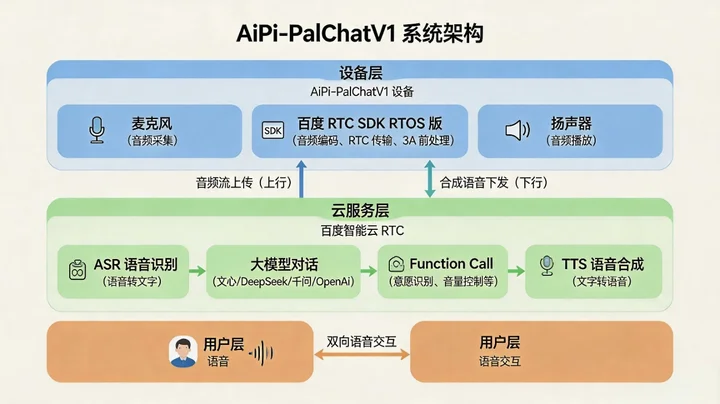
AiPi-PalChatV1 voice interaction uses a three-tier architecture: "device side + Baidu Cloud services + large AI models".
Core Concepts
| Concept | Description |
|---|---|
| AppID | Unique identifier of the application, generated automatically when an interactive application is created |
| AppKey | Application key, used to generate the authentication Token |
| Resource (License) | Device connection license; 1 License = 1 concurrent device |
| Token | Authentication credential, generated by signing AppID + AppKey + timestamp |
| Function Call | Mechanism for a large model to invoke device capabilities (e.g. adjust_volume to change the volume) |
Baidu RTC Workflow
To use the Baidu RTC real-time audio and video service from scratch, complete the following steps in order:
Register a Baidu AI Cloud account and complete identity verification. View details — Account Registration
Create an interactive application in the RTC console and obtain the AppID and AppKey. View details — Application Creation
Customize the AI assistant’s identity, personality and reply style. View details — Role Configuration
Bind a License resource to the application; new users can claim 10 free of charge. View details — Binding Resources
Collect the parameters required for the device to connect (AK/SK, AppID, etc.). View details — Getting Connection Info
Flash the Baidu RTC test firmware to the AiPi-PalChatV1 development board. View details — Flashing Test
Power on after flashing is complete to verify that Baidu RTC works properly. View details — Power-on Test
💡 Note: Please follow the steps strictly in order; each step builds on the result of the previous one.
Official Baidu RTC documentation: https://cloud.baidu.com/doc/RTC/index.html