

⚠️ 产品声明 / Product Disclaimer
非量产产品,仅供工程验证,不承诺符合 RoHS。 Non-mass-production product; for engineering verification only. RoHS compliance is not guaranteed.
Overview
emMCP (Easy MCU MCP) is an open-source adaptation library from Ai-Thinker for quickly interfacing with the UART-MCP protocol of the Xiao An AI module (AiPi-PalChatV1). It encapsulates UART send/receive, JSON parsing, command packing and a state machine, so developers only need to implement 3 low-level interfaces and call 3 APIs to complete the integration, with a minimal footprint of just RAM 62 bytes / Flash 1708 bytes.
The official base project already has emMCP ported (configuration, send/receive interfaces, heartbeat loop and receive callback are all ready). This chapter first walks through the porting implementation in the official project, then upgrades the configuration (tool count limit and registration mode), and finally verifies communication.
Official repository: https://github.com/Ai-Thinker-AIoT/emMCP
Your project (~/DOCS_TEST1, copied from the official one) already includes the emMCP framework (the emMCP/, port/ and uart-mcp/ directories at the repository root), so there is no need to clone or copy anything. Confirm the directories exist:
cd ~/DOCS_TEST1
ls ../../../emMCP   # you should see three directories: emMCP/, port/, uart-mcp/
Core framework directories:
emMCP/
├── emMCP/            # CMake project entry point (add_library(emMCP INTERFACE))
├── port/             # ★ Porting layer: write the MCU adaptation code here
│   ├── uartPort.c    # UART send/receive interfaces
│   ├── uartPort.h
│   └── emMCP_port_config_example.h   # Configuration template (copy it out, rename and use)
└── uart-mcp/         # Framework core: protocol parsing, state machine, tool management (no changes needed)
    ├── emMCP.c
    ├── emMCP.h       # ★ All API declarations
    └── cJSON/        # Lightweight JSON library
File path: ~/DOCS_TEST1/components/emMCP_config.h
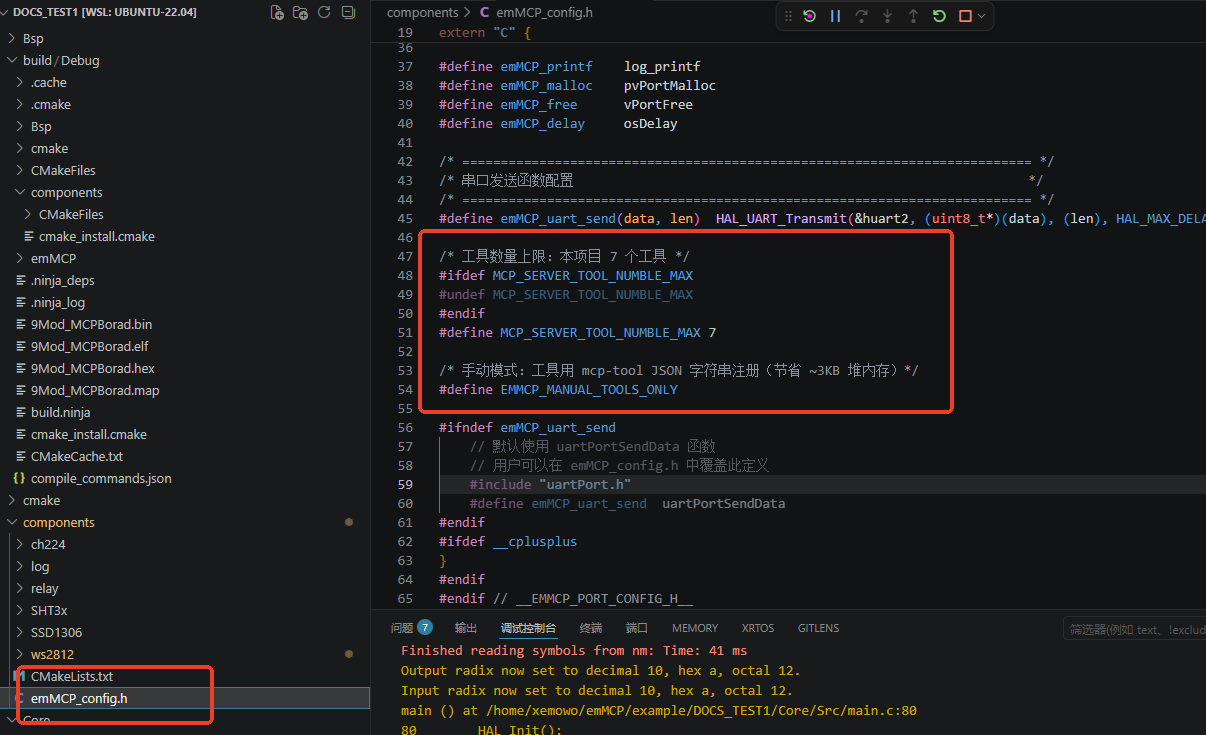
The official default configuration already contains the basic macros: emMCP_printf/malloc/free/delay and the emMCP_uart_send UART transmit macro. To support the multiple tools in the following chapters, insert the following two blocks right after the emMCP_uart_send macro:
#define emMCP_uart_send(data, len)  HAL_UART_Transmit(&huart2, (uint8_t*)(data), (len), HAL_MAX_DELAY)  ← existing code
/* Maximum number of tools: this project has 7 tools */
#ifdef MCP_SERVER_TOOL_NUMBLE_MAX
#undef MCP_SERVER_TOOL_NUMBLE_MAX
#endif
#define MCP_SERVER_TOOL_NUMBLE_MAX 7

/* Manual mode: tools are registered with an mcp-tool JSON string (saves ~3KB of heap memory) */
#define EMMCP_MANUAL_TOOLS_ONLY
#ifndef emMCP_uart_send
...
What the four macros do (already configured in the official project):
emMCP_delay(delay),emMCP_malloc/emMCP_free(memory),emMCP_uart_send(UART transmit, pointing to USART2),emMCP_printf(logging).
File path: ~/DOCS_TEST1/Core/Src/freertos.c
Transmit side: the emMCP_uart_send macro in emMCP_config.h already points to HAL_UART_Transmit(&huart2,...), so uartPortSendData() in port/uartPort.c needs no changes.
Receive side: the official project already implements USART2 idle interrupt + DMA reception in the HAL_UARTEx_RxEventCallback callback, calling uartPortRecvData() to hand the whole frame to emMCP and restarting the next DMA reception:
/* freertos.c -- already implemented in the official project (simple version) */
void HAL_UARTEx_RxEventCallback(UART_HandleTypeDef *huart, uint16_t Size) {
  if (huart == &huart2) {
    uartPortRecvData((char *)rxBuffer, Size);              // hand it to emMCP for parsing
    HAL_UARTEx_ReceiveToIdle_DMA(&huart2, rxBuffer, RXBUFFSER_MAX_SIZE);  // restart DMA reception
    __HAL_DMA_DISABLE_IT(huart2.hdmarx, DMA_IT_HT);
  }
}
⚠️ Upgrade to the multi-message unpacking version (the final code of the example project): the official simple version hands the whole frame straight to emMCP; if the AI sends several messages at once (tool call + subtitles), parsing gets mixed up. The example project performs brace-depth matching unpacking on the received data, supporting several JSON messages in one go. Upgrade in the following three steps:
Step 1: add the unpacking variables in the Variables section (inside USER CODE BEGIN Variables):
/* USER CODE BEGIN Variables */
static char rx_msg_buf[4][RXBUFFSER_MAX_SIZE];
static volatile uint8_t rx_msg_count = 0;
static uint8_t rx_msg_idx = 0;
static char rx_raw_buf[RXBUFFSER_MAX_SIZE];
/* USER CODE END Variables */
Step 2: replace the receive callback with the unpacking version:
void HAL_UARTEx_RxEventCallback(UART_HandleTypeDef *huart, uint16_t Size) {
  if (huart == &huart2) {
uartPortRecvData((char *)rxBuffer, Size);               ← official simple version, delete
uint16_t sz = Size < RXBUFFSER_MAX_SIZE ? Size : RXBUFFSER_MAX_SIZE - 1;
    memcpy(rx_raw_buf, rxBuffer, sz);
    rx_raw_buf[sz] = '\0';
    HAL_UARTEx_ReceiveToIdle_DMA(&huart2, rxBuffer, RXBUFFSER_MAX_SIZE);  ← existing code
    __HAL_DMA_DISABLE_IT(huart2.hdmarx, DMA_IT_HT);                       ← existing code
/* Unpacking: brace-depth matching, supports multiple JSON messages */
    char *p = (char *)rx_raw_buf;
    rx_msg_count = 0;
    while (rx_msg_count < 4) {
      char *start = memchr(p, '{', sz - (p - (char *)rx_raw_buf));
      if (!start) break;
      int depth = 0;
      char *end = start;
      while (end < (char *)rx_raw_buf + sz) {
        if (*end == '{') depth++;
        else if (*end == '}') { depth--; if (depth == 0) break; }
        end++;
      }
      if (depth != 0) break;
      int len = end - start + 1;
      if (len >= RXBUFFSER_MAX_SIZE) len = RXBUFFSER_MAX_SIZE - 1;
      memcpy(rx_msg_buf[rx_msg_count], start, len);
      rx_msg_buf[rx_msg_count][len] = '\0';
      rx_msg_count++;
      p = end + 1;
    }
    if (rx_msg_count > 0) {
      rx_msg_idx = 0;
    }
  }
}
Step 3: process the unpacked messages one by one in the main loop (inside the for loop of StartDefaultTask):
  for (;;) {                                                  ← existing code
    while (rx_msg_idx < rx_msg_count) {
      uartPortRecvData(rx_msg_buf[rx_msg_idx], strlen(rx_msg_buf[rx_msg_idx]));
      rx_msg_idx++;
      emMCP_TickHandle(100);
    }
    emMCP_TickHandle(100);                                  ← existing code
  }
DMA reception is started at the beginning of the StartDefaultTask task; the official project already implements it, so there are no changes to make.
File path: ~/DOCS_TEST1/Core/Src/freertos.c, the StartDefaultTask function
The official project already implements all the initialization and the heartbeat, so no changes are needed:
/* freertos.c -- already implemented in the official project */
HAL_UARTEx_ReceiveToIdle_DMA(&huart2, (uint8_t *)rxBuffer, sizeof(rxBuffer));  // start DMA reception
__HAL_DMA_DISABLE_IT(huart2.hdmarx, DMA_IT_HT);
emMCP_Init(&emMCP);                                  // initialize the framework
for (;;) {
  emMCP_TickHandle(100);                             // heartbeat loop, handles send/receive data
}
Build (graphical): click the CMake icon in the VSCode activity bar on the left → select Debug as the build preset → click the Build button (for the exact operations and screenshots, see step ① of Building and Downloading the Project).
The build finishes with 0 errors. If it reports a missing header file, check whether the include paths contain components/, port/ and uart-mcp/ (check whether components/, port/, uart-mcp/ are among the include paths).
Flash (graphical): connect the ST-Link (SWDIO→PA13, SWCLK→PA14, GND→GND) and map it into WSL with Seahi-Serial, then click the “Flash and Debug STM32F103 (OpenOCD)” button in the VSCode bottom bar to flash (for the exact operation, see step ② of Building and Downloading the Project).
Verify communication:
-
Power on the board and let the AI module connect to Wi-Fi;
-
Connect USART1 (PA9) with the Seahi-Serial serial assistant at a baud rate of 1500000; you should see:
[INFO] emMCP init done, MAX_TOOLS=7 -
Say “Xiao An, hello” to the AI module; once it wakes up, the following in the serial log means the port succeeded:
[DEBUG] emMCP_EventCallback: emMCP_EventCallback: event:8,type:4,param:2.WakeUP
No WakeUP log? ① The AI module isn’t network-configured: refer to the AiPi-PalChatV1 documentation and configure it with the App first; ② wrong wiring: the AI module must connect to USART2 (PA2→module RX, PA3→module TX), while debug logs come out on USART1; ③ wrong baud rate: USART2 must be 115200, USART1 is 1500000.
FAQ & Troubleshooting
🔧 Build error fatal error: emMCP.h: No such file or directory
Cause: the include paths are not configured
Fix: in the top-level CMakeLists, make sure add_subdirectory pulls in emMCP and that components/CMakeLists sets EMCP_USER_CONFIG_FILE; the include directory must contain uart-mcp/
🔧 Build error: EMCP_USER_CONFIG_FILE undefined
Cause: the configuration file path isn't passed in
Fix: in the top-level CMakeLists, set(EMCP_USER_CONFIG_FILE ...) must come before add_subdirectory(emMCP)
🔧 After flashing, commands are received only the first time, then nothing
Cause: the receive callback doesn't restart DMA reception
Fix: HAL_UARTEx_ReceiveToIdle_DMA(&huart2, ...) must be called again inside the callback (see step ③ for how this project does it)
🔧 Saying "Xiao An, hello" produces no log at all
Cause: ① the module isn't network-configured ② wrong wiring ③ wrong baud rate
Fix: ① configure it with the App (see AiPi-PalChatV1) ② the AI module must connect to USART2 (PA2/PA3) ③ USART2=115200
🔧 Garbled serial log
Cause: wrong baud rate in the serial assistant
Fix: the USART1 debug log runs at 1500000 (not 115200!)
🔧 WakeUP appears but the AI doesn't answer
Cause: wrong module firmware version
Fix: make sure the module firmware is the UART-MCP version (see the AiPi-PalChatV1 docs to flash the firmware)
🔧 Hardfault right after emMCP_Init
Cause: the FreeRTOS heap is too small, so memory allocation fails
Fix: check that configTOTAL_HEAP_SIZE ≥ 6656 (this project's value; changing it to 4096 makes the WS2812 buffer allocation fail)
🔧 log.h not found after porting to your own project
Cause: emMCP_config.h includes log.h
Fix: either port the log component along with it, or change the emMCP_printf macro to your own logging function
🔧 No response after switching to another UART
Cause: emMCP_uart_send still points to the old UART
Fix: in emMCP_config.h, change emMCP_uart_send to your AI module's UART (huart2 in this project)
🔧 Manually sending a JSON command gets no response from the MCU
Cause: ① "Send new line" isn't checked ② wrong message format
Fix: ① check send new line (\r\n) in the serial assistant ② follow the {"role":"AI","msgType":"MCP","data":{...}} format strictly
The Ultimate Sign of a Successful Port
Say "Xiao An, hello" to the AI module and WakeUP shows up in the serial log; then say "what's the weather like today" and the AI module replies normally (even if the MCU performs no action at all) — that means the emMCP send/receive path is fully working.