

⚠️ 产品声明 / Product Disclaimer
非量产产品,仅供工程验证,不承诺符合 RoHS。 Non-mass-production product; for engineering verification only. RoHS compliance is not guaranteed.
Overview
The official base project already includes the SSD1306 OLED driver (components/SSD1306, with Chinese font support) and initializes it in the ws2812_modeTask task — right now all it shows is a welcome page ("Welcome to the Jiuzhang Dev Board"). The official project reads temperature and humidity every second (sht3x_read_task) but only prints them to the serial port; nothing goes to the screen. This chapter puts that data on the screen: define global variables → display them from a status-page function → refresh every second, so the screen shows the ambient temperature and humidity in real time.
The OLED uses SPI1 (PA5 SCK / PA7 MOSI); chip select and DC use GPIO (PA4 / PA1). This project's
components/SSD1306/axk_ssd1306.cis already adapted, and comes with GT20L16S Chinese font support (accessed through CS2 = PB0).
The official base project already includes the OLED driver components/SSD1306/axk_ssd1306.c (with Chinese font support) — no need to copy anything. The matching module in the SCBB library is named OLED096 (same SSD1306 controller chip); for reference if you start from a blank project:
dir AiPi-SCBB\OLED096
# axk_oled096.c  axk_oled096.h
The SPI BSP the driver depends on (already implemented in Bsp/spi/stm32f10x_bsp_spi.c):
void bsp_spi_init(void);                 // initialize the SPI1 master
void bsp_spi_cs1_reset(void);            // pull OLED_CS1 (PA4) low → select the OLED
void bsp_spi_cs1_set(void);              // pull it high → release
void bsp_spi_cs2_reset(void);            // CS2 (PB0) selects the font chip
void bsp_spi_transmit_dma(const uint8_t *data, uint16_t size);  // DMA transfer
Add the SSD1306 directory (including the gt20l16s subdirectory) to components/CMakeLists.txt.
| OLED Module | Connect to Board |
|---|---|
| DIN (data) | PA7 (SPI1_MOSI) |
| CLK (clock) | PA5 (SPI1_SCK) |
| CS (chip select) | PA4 |
| DC (data/command) | PA1 |
| RES (reset) | 3.3V, or controlled by the driver (this project pulls it high from a driver GPIO) |
| VCC | 3.3V |
| GND | GND |
The official base project already initializes the OLED in the ws2812_modeTask task and shows a welcome page:
axk_ssd1306_init();
axk_ssd1306_set_color_turn(0);
axk_ssd1306_set_display_turn(0);
axk_ssd1306_clear_screen();
axk_ssd1306_show_utf8_str(32, 0, "欢迎使用");
axk_ssd1306_show_utf8_str(24, 3, "九章开发板");
Core APIs (axk_ssd1306.h):
axk_ssd1306_init();
axk_ssd1306_set_color_turn(0);      // normal color (1 inverts it)
axk_ssd1306_set_display_turn(0);    // normal orientation (1 flips it 180°)
axk_ssd1306_clear_screen();
There are only three core APIs (axk_ssd1306.h):
void axk_ssd1306_clear_screen(void);                          // clear the screen
void axk_ssd1306_show_utf8_str(x, y, str);                    // show a string (UTF-8, uses the font chip automatically)
// x: 0~15 (8 pixel columns per character), y: 0~7 (8 pixels per row) → 128x64 = 8 rows
What this step does: The official project reads temperature and humidity every second (in the sht3x_read_task task), but only prints them to the serial port — it never shows them on screen. This chapter puts them on the OLED: promote the data to global variables → display it from a status-page function → refresh every second, so the screen shows the ambient temperature and humidity in real time.
File path: C:\Users\YourName\DOCS_TEST1/Core/Src/freertos.c — 7 changes in total
Change 1: Add the stdio.h header (needed by the snprintf function)
Location: add it after /* USER CODE BEGIN Includes */:
/* USER CODE BEGIN Includes */
#include    // needed by snprintf
/* USER CODE END Includes */
Change 2: Define the global temperature/humidity variables
Location: add it after /* USER CODE BEGIN Variables */:
/* USER CODE BEGIN Variables */
double g_temp = 0.0;   // temperature, for the screen
double g_hum  = 0.0;   // humidity, for the screen
/* USER CODE END Variables */
Change 3: Add the function prototype (ui_show_status is defined after it is called, so it must be declared first)
Location: add it after /* USER CODE BEGIN FunctionPrototypes */:
/* USER CODE BEGIN FunctionPrototypes */
void ui_show_status(void);   // status-page prototype
/* USER CODE END FunctionPrototypes */
Change 4: Store the readings in the global variables
Location: in the sht3x_read_task function, after res = axk_sht3x_read(0x2c06, &temperature, &humidity); and after the if (res != 0) { ... continue; } block (this point is only reached when the read succeeded) — insert two lines:
    res = axk_sht3x_read(0x2c06, &temperature, &humidity);   ← existing code
if (res != 0) { log_error("sht3x read error: %d", res); continue; }   ← existing code
g_temp = temperature;   // save to the globals, for the screen
g_hum  = humidity;
Change 5: Replace the welcome-page display code
Location: inside the ws2812_modeTask function, the two official welcome-page lines:
axk_ssd1306_init();                                       ← existing code
axk_ssd1306_show_utf8_str(32, 0, "欢迎使用");   ← delete
axk_ssd1306_show_utf8_str(24, 3, "九章开发板");   ← delete
ui_show_status();   // call the status-page function   ← replace with
axk_ws2812_init(&ws2812);                               ← existing code
Change 6: Add the status-page function
Location: add it after /* USER CODE BEGIN Application */ (the official project already implements the receive callback in this section — just add it after that):
/* USER CODE BEGIN Application */
void ui_show_status(void) {
  char buf[32];
  uint8_t ti = (uint8_t)g_temp, td = ((uint8_t)(g_temp * 10)) % 10;
  uint8_t hi = (uint8_t)g_hum, hd = ((uint8_t)(g_hum * 10)) % 10;

  /* line 1: system name */
  axk_ssd1306_show_utf8_str(0, 0, "九章开发板");

  /* line 3: real-time temperature (%2d.%d integer concatenation) */
  snprintf(buf, sizeof(buf), "    T:%2d.%d C    ", ti, td);
  axk_ssd1306_show_utf8_str(0, 2, buf);

  /* line 5: real-time humidity */
  snprintf(buf, sizeof(buf), "    H:%2d.%d %%   ", hi, hd);
  axk_ssd1306_show_utf8_str(0, 4, buf);
}
/* USER CODE END Application */
Change 7: Refresh the screen periodically
Location: inside the loop of the sht3x_read_task function, add it after (the two assignment lines added in Change 4):
    g_temp = temperature;                                     ← the two lines added in Change 4
g_hum  = humidity;
ui_show_status();   // refresh the screen every second (after a successful read)
⚠️ Don’t skip this step: it is the key to a screen that keeps updating. Without it, the screen only shows the values once at boot (the 0.0 values from startup) and the numbers never change again.
-
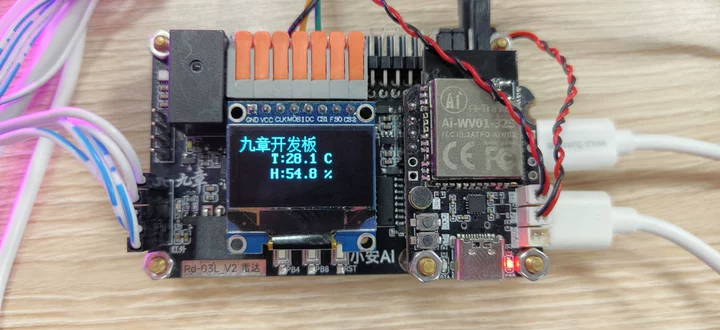
Build and flash using the graphical method in Build and Flash the Project; after power-up the screen should show:
九章开发板 T:29.2 C H:52.4 % -
The temperature and humidity values refresh every second (cup your hand over the sensor and watch the numbers change) — this proves the “global variables → display function → periodic refresh” chain works. The Chapter 8 temperature/humidity query tool reuses
g_temp/g_humdirectly.
Troubleshooting:
| Symptom | Check |
|---|---|
| Screen stays dark | Check the SPI wiring (PA5/PA7/PA4/PA1), the power supply (3.3V), and whether the RES pin is pulled high |
| Garbled / corrupted image | Confirm the DMA for SPI1_TX (DMA1_Channel3) is configured; check the CubeMX .ioc |
| Chinese text renders incorrectly | The font chip GT20L16S needs CS2 (PB0) connected properly or held high |
FAQ & Troubleshooting
🔧 The screen stays completely dark
Cause: ① Power/wiring ② RES left floating ③ Wrong CS selected
Fix: ① VCC 3.3V and GND to a common ground ② RES must be pulled high (many modules leave it floating; connecting it to 3.3V is enough — this project pulls it high from a driver GPIO) ③ Make sure you connected the OLED's CS (PA4), not the font chip's CS2 (PB0)
🔧 The screen lights up but only half of it shows / the image is garbled
Cause: Wrong SPI line order, or the DMA is not configured
Fix: Verify DIN→PA7 and CLK→PA5; confirm the DMA for SPI1_TX (DMA1_Channel3) is configured in CubeMX
🔧 Displayed content is incomplete or garbled
Cause: ① Data sent too fast ② Font-chip access conflict
Fix: ① Check the SPI prescaler (128 is enough) ② The Chinese font chip GT20L16S needs CS2 (PB0) connected properly or held high, so the font chip can be read correctly when displaying Chinese
🔧 Chinese text shows as boxes or question marks
Cause: The font chip is not connected, or the glyphs are missing
Fix: Confirm the GT20L16S wiring (shared SPI bus + CS2 = PB0); this font chip has the common GB2312 Chinese characters built in
🔧 The screen is white at power-up and stays white
Cause: Initialization failed, or the reset pin is held low
Fix: Check that axk_ssd1306_init() is called (it should be inside the task); do not connect the RES pin to GND
🔧 Content appears in the wrong position
Cause: Misunderstanding of x/y
Fix: axk_ssd1306_show_utf8_str(x, y, str): x is the column (0~15, 8 pixels per character) and y is the row (0~7) — these are not pixel coordinates
🔧 The screen occasionally flickers or tears
Cause: The refresh collides with the DMA transfer
Fix: Do not refresh the display data and call bsp_spi_transmit_dma concurrently; this project runs them in separate tasks, staggered with osDelay
🔧 The temperature and humidity values never update
Cause: The periodic refresh logic never runs
Fix: Confirm that sht3x_read_task calls the refresh function inside its loop (this project refreshes once per second)
🔧 Pressing the button does not turn the page
Cause: Button pin / debounce
Fix: This project uses PB4 (page up) / PB8 (page down); the button must be held to trigger (btn_pressed applies 20 ms debounce)
Black Screen Troubleshooting Order (Highest Probability First)
- Is RES pulled high → 2. Are VCC/GND wired correctly → 3. Are DIN/CLK wired correctly (PA7/PA5) → 4. Is the correct CS selected (PA4) → 5. Is the SPI DMA configured → 6. Is the init function being called. Nine out of ten black screens come down to wiring problems in items 1~3.